

Hello my friends. In this writing, I am going to tell about to installing apache load balancer on Windows. Firstly download setup file from this page and then download mod_jk.so file from this page. mod_jk.so file provides connectivity between apache and tomcat.
- Set up the apache after downloading the files.
- Add the following lines into the “httpd.conf” in the …/Apache2.2/conf.
LoadModule jk_module modules/mod_jk.so
JkWorkersFile conf/workers.properties
JkLogFile logs/mod_jk.log
JkLogLevel info
JkLogStampFormat "[%a %b %d %H:%M:%S %Y] "
JkOptions +ForwardKeySize +ForwardURICompat -ForwardDirectories
JkRequestLogFormat "%w %V %T"
JkMount /mountFolderName/* loadbalancer
JkMount /jkmanager/* jkstatus
- Create the workers.properties file as following.
worker.list=loadbalancer

worker.instance1.type=ajp13
worker.instance1.host=172.16.1.48
worker.instance1.port=7061
worker.instance1.lbfactor=1
worker.instance1.connection_pool_timeout=600
worker.instance1.socket_timeout=300

worker.instance2.type=ajp13
worker.instance2.host=172.16.1.48
worker.instance2.port=7051
worker.instance2.lbfactor=1
worker.instance2.connection_pool_timeout=600
worker.instance2.socket_timeout=300

worker.loadbalancer.type=lb
worker.loadbalancer.balance_workers=instance1,instance2
worker.loadbalancer.sticky_session=1
#worker.loadbalancer.method=B

worker.list=jkstatus
worker.jkstatus.type=status
- Configure the tomcat server.xml file as following.
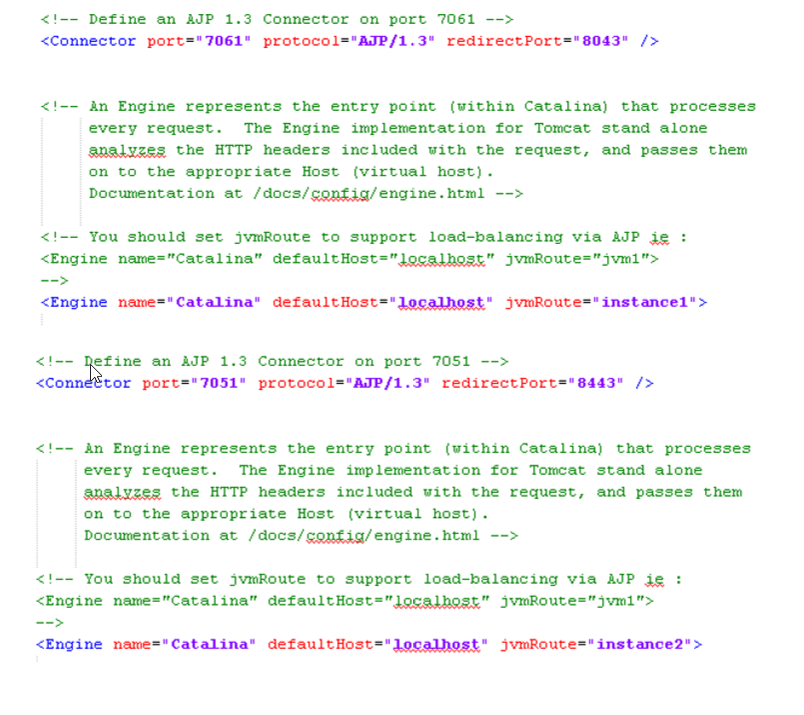
- Restart tomcat’s and apache server after that done all of settings.
- After, open url http://localhost/jkmanager/jkstatus ve see both tomcat nodes status.

 Deniz Güzel
Leave a comment