Jenkins Slack Notification Plugin Ayarı

Merhabalar, bugünkü yazımda jenkins job’ının sonuçlarını slack üzerinden uyarı şeklinde verdirilmesini sağlayan Slack Notification eklenti kurulumu ve ayarlarını basit bir örnek ile anlatmaya çalışacağım.

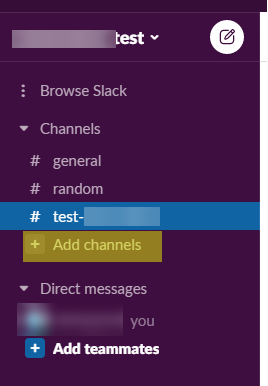
Bunun için ilk önce slack ekranımıza gidiyoruz. Slack üzerinde bir channel açıyoruz.
• Browse Slack 
Channels 
# general 
# random 
# test 
nels 
• Direct messages 
• you

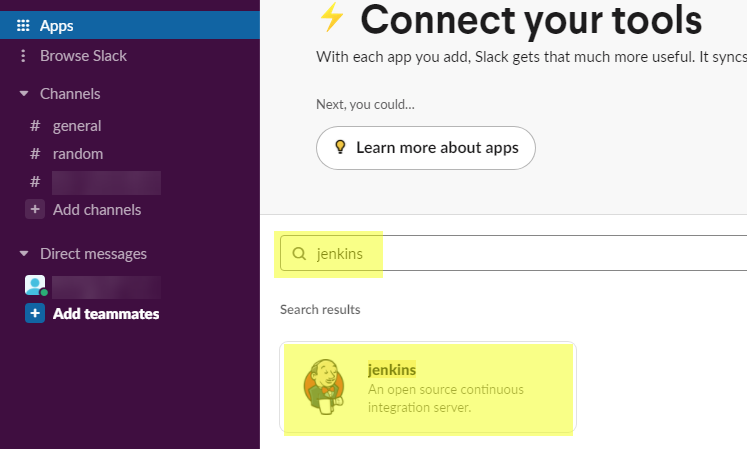
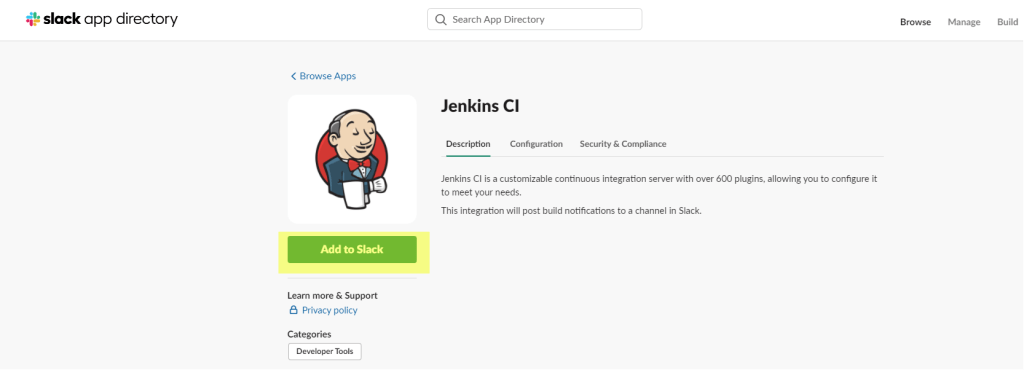
Apps linki üzerinden jenkins aratıyoruz. Arama sonucunda çıkan Jenkins seçeneğini seçip ardından açılan ekranda Add to Slack ile app imizi ekliyoruz.
Browse Slack 
Channels 
# general 
# random 
+ Add channels 
• Direct messages 
Connect your tools 
With each app you add, Slack gets that much more useful. It syncs 
Next, you could... 
O Learn more about apps 
Q jenkins 
Search results 
jenkins 
An open nurce continuous 
integration server.

App eklendikten sonra jenkins ayarlarının ve token bilgisinin olduğu sayfa açılır. Buradaki bilgileri bir yere not alıyoruz çünkü bunları jenkins plugin ayarında kullanacağız.
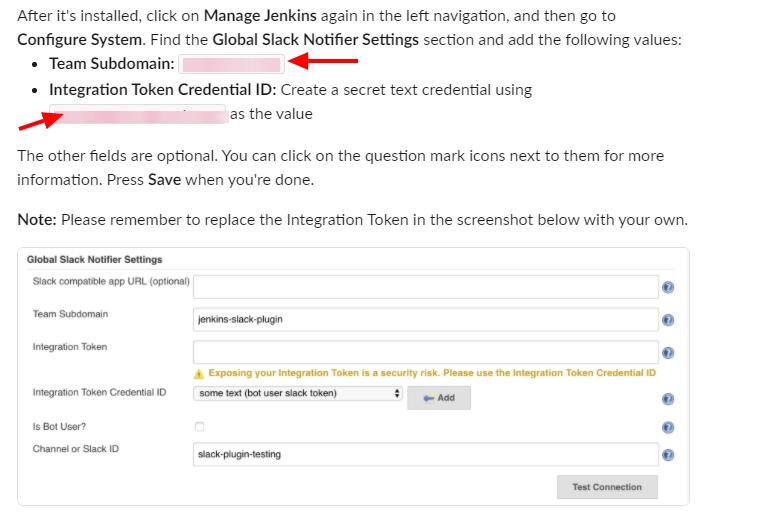
After it's installed, click on Manage Jenkins again in the left navigation, and then go to 
Configure System. Find the Global Slack Notifier Settings section and add the following values: 
Team Subdomain: 
Integration Token Credential ID: Create a secret text credential using 
as the value 
The other fields are optional. You can click on the question mark icons next to them for more 
information. Press Save when you're done. 
Note: Please remember to replace the Integration Token in the screenshot below with your own. 
Notifi« Settings 
Slack compatile app URL (optimal) 
your is a "curity risk _ 
text user 
Inwation Token Credential 10 
Is Bot User-7 
Chamel Slack

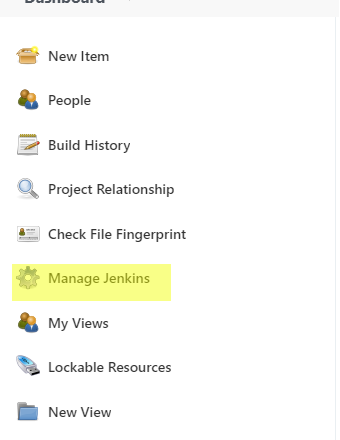
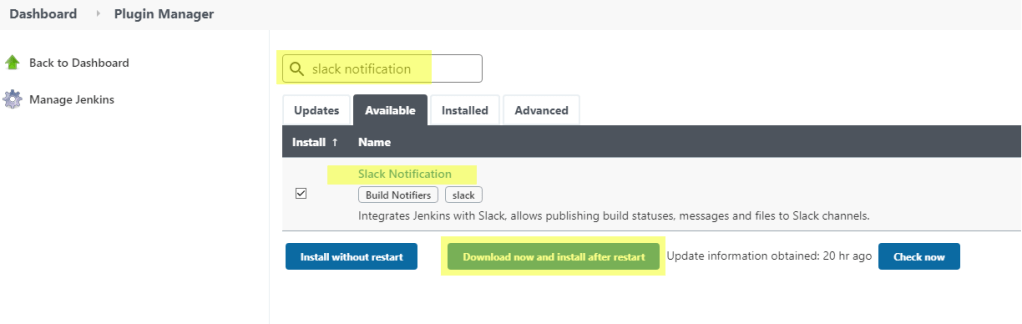
Jenkins üzerinde sırası ile Manage Jenkins > Manage plugins açılır. Plugin manager ekranında Available tabı açılır. Burada aramaya Slack Notification yazılır. Download now and install after restart ile plugin yüklenir.
New Item 
People 
Build History 
Project Relationship 
Check File Fingerprint 
Manage Jenkins 
My Views 
Lockable Resources 
New Vi ew
Dashboard 
Plugin Manager 
Back to Dashboard 
Manage Jenkins 
Q slack notification 
Updates 
Install T 
Available 
Name 
Installed 
Advanced 
Slack Notification 
Integrates Jenkins with Slack, allows publishing build statuses, messages and files to Slack channels. 
"Sta " without 
Download now and irstall aft« restart 
Update information obtained: 20 hr ago

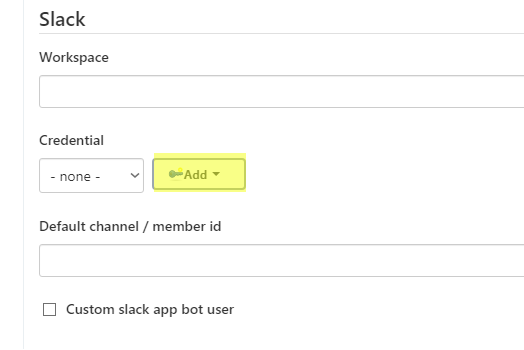
Manage Jenkins > Configure settings açılır. Burada Slack kısmına gelinir ve credential kısmında Add butonuna basılır.
Slack 
Workspace 
Credential 
none - 
Default channel / member id 
Custom slack app bot user

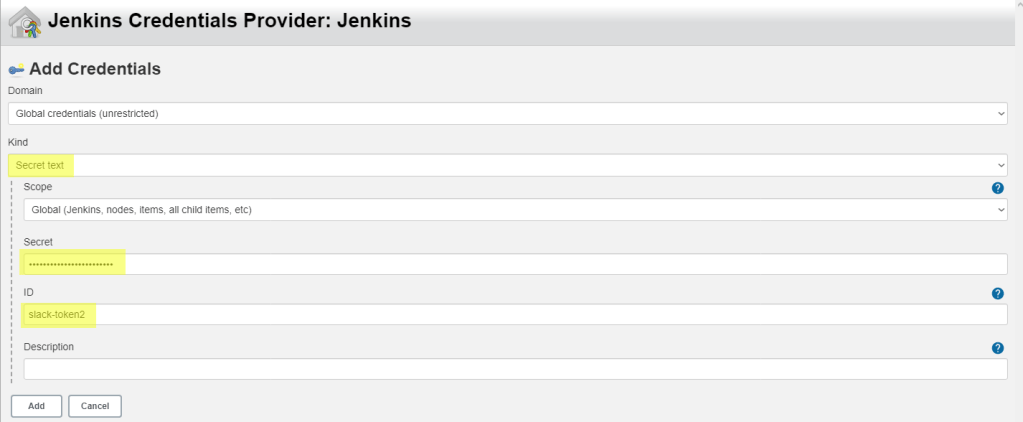
Credential ekleme ekranında Kind türü Secret Test seçilir. Secret bilgisine daha önce slack sayfasında not aldığımız token değerini yazıyoruz. ID kısmına herhangi bir şey yazabilirsiniz.
Jenkins Credentials Provider: Jenkins 
Add Credentials 
Domain 
Global credentials (unrestricted) 
Kind 
Secret text 
Scope 
Global (Jenkins, nodes, items: all child items, etc) 
Secret 
ID 
slack-token2 
Description 
Add 
Cancel

Credential kaydedildikten sonra slack ayarı ekranında bunu seçiyoruz. Workspace ve channel kısmına slack üzerindeki bilgileri giriyoruz. Bilgileri girdikten sonra Test Connection butonu ile bağlantıyı test edip sol taraftaki Success mesajını alarak kontrol sağlayabilirsiniz.

Slack 
Workspace 
test 
Credential 
slack-token v 
Default channel / member id 
test- 
Custom slack app bot user 
Success 
O 
O 
Advanced... 
Test Connection

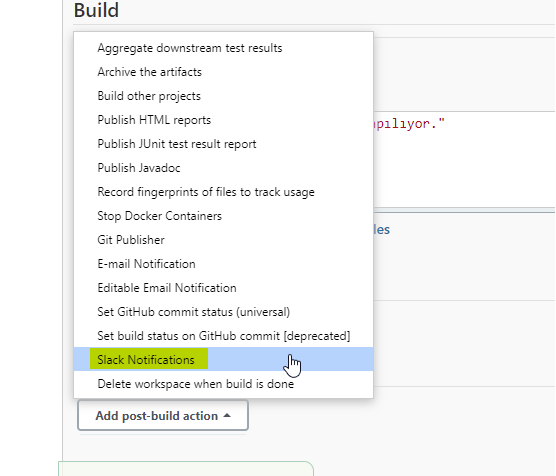
Bağlantımızı da sağladıktan sonra şimdi bir jenkins job oluşturarak plugini deneyebiliriz. Ben job eklemiş kabul ederek job ayarlarına configure settings ile giriyorum. Ayarlarda Add post-build actions ile Slack Notifications seçilir.
Build 
Aggregate downstream test results 
Archive the artifacts 
Build other projects 
Publish HTML reports 
Publish JlJnit test result report 
Publish Javadoc 
Record fingerprints of files to track usage 
Stop Docker Containers 
Git Publisher 
E-mail Notification 
Editable Email Notification 
Set GitHub commit status (universal) 
Set build status on GitHub commit (deprecated) 
Delete workspace when build is done 
Add post-build action 
plllyor. '

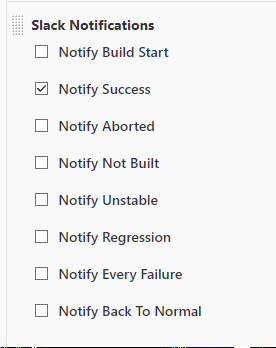
Aşağıdaki ekranda uyarı tipinizi belirleyerek job ınız alınan aksiyona göre slack üzerinden kanalınıza uyarı mesajı gidecektir.
Slack Notifications 
Notify Build Start 
Notify Success 
Notify Aborted 
Notify Not Built 
Notify Unstable 
Notify Regression 
Notify Every Failure 
Notify Back To Normal

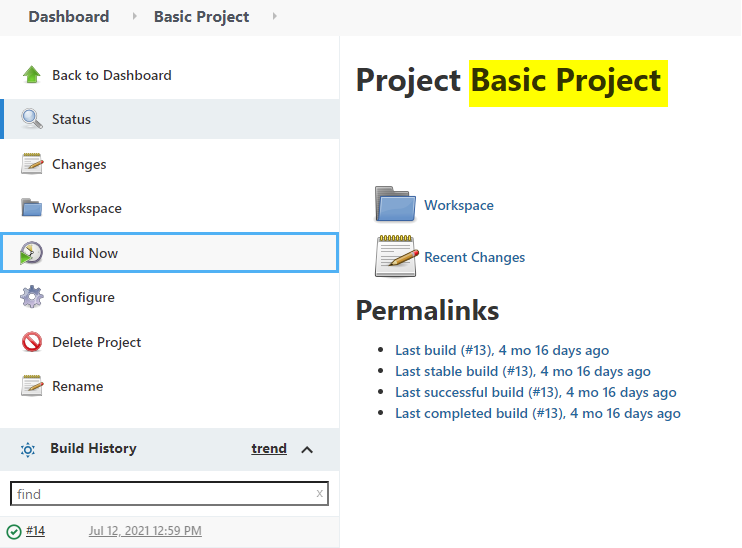
Ben başarılı bir durum olduğunda uyarı versin istedim. Job’ımı başlattım ve slack üzerindeki uyarısı da aşağıdaki şekilde oldu.
Dashboard 
Basic Project 
Back to Dashboard 
Status 
Changes 
Workspace 
Build Now 
Configure 
Delete Project 
Rename 
Build History 
Jul 12, 2021 12:59 PM 
Project Basic Project 
Workspace 
Recent Changes 
Permalinks 
Last build (#13), 4 mo 16 days ago 
Last stable build (#13), 4 mo 16 days ago 
Last successful build (#13), 4 mo 16 days ago 
Last completed build (#13), 4 mo 16 days ago 
trend 
find 
@EJA

Slack mesajı:

jenkins 
APP 12:59 PM 
Basic Project - #14 Success after 16 ms (Open)

En basit hali ile jenkins job’ının slack üzerinden uyarı verme sürecini bu şekilde anlatmaya çalıştım. Faydalı olması dileği ile bir sonraki yazıda görüşmek üzere.


Leave a comment
